Showing posts with label Networking. Show all posts

Thursday, 26 September 2013

Private VLAN Concepts

Private VLANs: Extending the abilities of a VLAN

The private VLAN feature provides the ability to extend the capabilities of a “standard” VLAN. It does this by introducing some additional concepts: Primary VLAN, Community VLAN and Isolated VLAN. The Primary VLAN should be considered the Master in the master/slave relationship with the other two sub-types. Switch ports assigned within the primary VLAN are able to see traffic from all devices within the primary VLAN and all sub-types (also referred to as secondary VLANs).

Both Community and Isolated VLANs should be considered slaves in the master/slave relationship with the primary VLAN. Switchports assigned to a Community VLAN can see traffic from all other devices in the same Community VLAN and can send traffic back and forth with devices in the primary VLAN. Switchports assigned to an Isolated VLAN can send traffic back and forth with devices in the primary VLAN, but CANNOT see traffic from other devices in the same Isolated VLAN.

It is important to understand that regardless of the VLAN assignment of the switchport, all of the devices will share the same IP subnet; the private VLAN feature just sets up rules as to which devices are able to speak to each other.

Private VLANs - Figure 1

Why Use a Private VLAN?

The next question really is why would an engineer want to implement the private VLAN feature? This section goes over a few possibilities.

What if an Internet Service Provider (ISP) had a limited number of subnet space and wanted to maximize it by assigning all of the customers in a geographic area into the same IP subnet. Of course, most customers do not want other people seeing their layer 2 switched traffic, as it opens up potential security issues. Individual customers who only have a single port connected into the service provider can be assigned into an isolated private VLAN; their traffic would then only be sent and received by the ISP devices connected directly to the primary VLAN.

What if a company existed in the same geographic area and had multiple offices with multiple Internet connections? It is possible with community VLANs to connect all of these Internet connections together so that each would be able to talk directly to each other as well as go out and utilize the same Internet connection.

These are some very simple examples but they do show that the functionality of private VLANs can be useful to any design engineer looking for a solution to a specific set of design requirements.

(Note: Original Post is posted by Sean Wilkins at his blog http://www.trainsignal.com/blog/private-vlan-concepts)
 

Monday, 25 March 2013

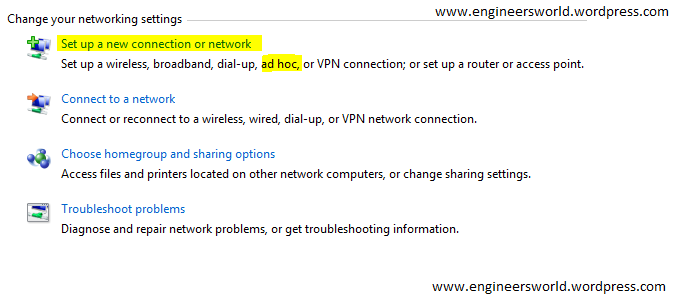
How to create a ad-hoc network

Many times we need to connect two or more computers may be for gaming purposes or public data transfers for that we need a adhoc network i.e. the computer to computer network.

For creating a ad-hoc network simply follow the steps below:

1 Open network and sharing center in you computer.
2.click on set up a new connection or network.


3. now choose set up a wireless ad hoc network.
4. give a name to your network, and password if you want.
5. your ad-hoc is ready , and starts waiting for other users to connect.

Friday, 1 March 2013

How to configure Static IP in Linux

With the below commands you can configure the Static IP address in a Linux machine.

Configure IP address and Subnetmask:

#sudo ifconfig eth0 192.168.1.2 netmask 255.255.255.0

Configure Default Gateway/Router:

#sudo route add default gw 192.168.1.2

Configure DNS addresses:

Under Linux / UNIX / BSD operating system, you need to edit the /etc/resolv.conf file and add the line:

#vi /etc/resolv.conf

Modify or enter nameserver as follows:

nameserver 4.2.2.2
nameserver 4.2.2.1


(Note in your network you should  use your ISP or your local DNS server addresses instead of 4.2.2.2 and 4.2.2.1)

Thursday, 6 December 2012

Configure Layer 3 EtherChannel between Cisco Router and Switch

Router:

interface Port-channel1
ip address 10.4.4.2 255.255.255.252
!
interface GigabitEthernet0/0/0
no ip address
channel-group 1
no shutdown
!
interface GigabitEthernet0/0/1
no ip address
channel-group 1
no shutdown

Switch:

interface Port-channel1
no switchport
ip address 10.4.4.1 255.255.255.252
!
interface GigabitEthernet1/0/3
no switchport
no ip address
channel-group 1 mode on
no shutdown
!
interface GigabitEthernet2/0/3
no switchport
no ip address
channel-group 1 mode on
no shutdown

(Note: Reference of this post is http://firewalltipss.blogspot.in/2011/07/configure-layer-3-port-channel.html )

Subnet Masks Cheat Sheet


The tables below are commonly used subnet masks and hosts.


Class C


Mask Notation  Subnets  Hosts 
255.255.255.0/241256
255.255.255.128/252128
255.255.255.192/26464
255.255.255.224/27832
255.255.255.240/281616
255.255.255.248/29328
255.255.255.252/30644
255.255.255.254/311282
255.255.255.255/322561


Class B


Mask Notation  Subnets  Hosts 
255.255.0.0/16165,536
255.255.128.0/17232,768
255.255.192.0/18416,384
255.255.224.0/1988,192
255.255.240.0/20164,096
255.255.248.0/21322,048
255.255.252.0/22641,024
255.255.254.0/23128512
255.255.255.0/24256256


Class A


Mask Notation  Subnets  Hosts 
255.0.0.0/8116,777,216
255.128.0.0/928,388,608
255.192.0.0/1044,194,304
255.224.0.0/1182,097,152
255.240.0.0/12161,048,576
255.248.0.0/1332524,288
255.252.0.0/1464262,144
255.254.0.0/15128131,072
255.255.0.0/1625665,536


(Note: Reference of the above post is http://firewalltipss.blogspot.in/search/label/Cheat%20Sheets )